The current AI landscape presents a familiar challenge: incredible capability fragmented across different tools and interfaces. You build with Copilot in VS Code, but the agent from another vendor lives somewhere else. Mission control is missing — and every context switch costs you momentum.
At GitHub Universe 2025, GitHub announced Agent HQ: the platform's next evolution, designed so that agents don't need to be bolted on. They work the way you already work, on the infrastructure you already trust.
What Is Agent HQ?
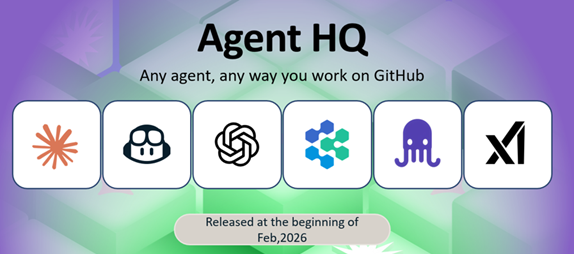
Agent HQ is GitHub's open ecosystem for coding agents. Instead of managing a patchwork of disconnected tools or subscribing to multiple services, developers now have a single platform that brings together agents from:
- Anthropic (Claude)
- OpenAI (Codex)
- Google (Jules)
- Cognition, xAI, and more
All of these are available as part of your paid GitHub Copilot subscription — no new accounts, no extra billing surfaces, no duplicated context. The primitives you rely on — Git, pull requests, issues, GitHub Actions — remain unchanged. Agent HQ layers new orchestration capability on top of that solid foundation.
Claude and Codex went into public preview on February 4, 2026 for Copilot Pro+ and Copilot Enterprise subscribers, available in GitHub, GitHub Mobile, and VS Code — with Copilot CLI support coming soon. Each agent session consumes one premium request, and access is expected to expand to more Copilot subscription types over time.
Why GitHub-Native Agents Matter
Coding agents are only useful if they fit into how teams already build software. Running them inside GitHub instead of as external tools changes three things in practice:
- Explore tradeoffs early. Run agents in parallel to surface competing approaches and edge cases before the code hardens.
- Keep context attached to the work. Agents operate inside your repository, issues, and pull requests instead of starting from stateless prompts — there is no copy-paste between tools, documents, and threads.
- Avoid new review processes. Agent-generated changes show up as draft pull requests and comments, reviewed the same way you would review a teammate's work. No new dashboards, no parallel AI workflow to learn.
"We're bringing Claude into GitHub to meet developers where they are. With
Agent HQ, Claude can commit code and comment on pull requests, enabling
teams to iterate and ship faster and with more confidence."
— Katelyn Lesse, Head of Platform, Anthropic
Mission Control: One Command Center Everywhere
The centrepiece of Agent HQ is mission control — a unified interface that follows you across GitHub, VS Code, mobile, and the CLI. Think of it as a task dispatcher for your fleet of agents. With mission control you can:
- Choose from the available agents and assign them discrete tasks.
- Run multiple agents in parallel on different parts of a project.
- Track progress from any device without switching surfaces.
- Use new branch controls to decide when CI and checks should run on agent-created code.
- Manage agent identity — which agent is building what, and under which access policy.
- Resolve merge conflicts with one-click resolution and browse changed files with improved navigation.
Mission control also connects to Slack, Linear, Atlassian Jira, Microsoft Teams, Azure Boards, and Raycast — so you can steer agents from wherever your team already communicates.
Code Quality, Metrics, and the Control Plane
Agent HQ ships three enterprise-grade capabilities that move AI governance from ad hoc to systematic:
GitHub Code Quality (public preview)
"LGTM" on a pull request doesn't guarantee the codebase stays healthy. GitHub Code Quality adds org-wide visibility into maintainability, reliability, and test coverage across every repository. It extends Copilot's existing security checks to also flag reliability and maintainability regressions in changed code — and runs an automatic first-line Copilot review before the code ever reaches a human reviewer.
Copilot Metrics Dashboard (public preview)
Organisations need to understand how Copilot is being used and what impact it is having. The Copilot Metrics Dashboard surfaces usage statistics and acceptance rates across the entire organisation, with API access for custom reporting pipelines.
Enterprise Control Plane (public preview)
The control plane is the governance layer for the agentic era. In one place, enterprise admins can:
- Define which agents are permitted in the organisation.
- Control which models are available to each team.
- Set security policies and audit logging requirements.
- Manage access to MCP servers and third-party integrations.
The control plane is separate from existing GitHub Enterprise policy settings. Evaluate which controls your security and compliance teams need before rolling out third-party agents to your organisation.
Getting Started with Claude and Codex Today
Claude and Codex are available now in public preview for Copilot Pro+ and Copilot Enterprise subscribers. Before you can use them, they must be explicitly enabled in your account settings — they are not on by default.
Enabling third-party agents
Third-party agents inherit the same repository access as the Copilot cloud agent — they can only act in repositories where cloud agent is already enabled.
Third-party coding agents are available on Copilot Pro, Pro+, Business, and Enterprise plans (not Copilot Free). On Business and Enterprise, the ability to enable Claude and Codex is controlled by policy at the organisation or enterprise level, not in personal settings — so the toggle may be hidden or read-only depending on how your admins have configured it.
Starting an agent session
You have three surfaces to choose from:
- GitHub.com / GitHub Mobile — Open the Agents tab in any enabled repository, enter your request, select an agent using the Copilot icon, and submit. Sessions run asynchronously; you can follow progress in real time or review completed logs later.
- VS Code (version 1.109 or later) — Open the Agent sessions view from the title bar or press
Ctrl+Shift+P/Cmd+Shift+Pand search for "agent sessions". Choose a session type (Local, Cloud, or Background) and pick your agent. - Issues and pull requests — Assign an issue directly to Copilot, Claude, or Codex. Mention
@Copilot,@Claude, or@Codexin a pull request comment to request follow-up work. Agents submit draft pull requests that go through your normal review workflow.
Agent output is always reviewable — agents submit draft pull requests and comments, not direct commits. Review their work the same way you would review a teammate's contribution.
Comparing Agents Side by Side
One of the most powerful — and underused — capabilities of Agent HQ is running multiple agents on the same task to compare how they reason. You can assign Copilot, Claude, and Codex to the same issue simultaneously and review the resulting draft pull requests side by side.
Practical strategies for multi-agent review:
- Architectural guardrails — Ask one agent to evaluate modularity and coupling to identify changes that could introduce unintended side effects.
- Logical pressure testing — Use another agent to hunt for edge cases, async pitfalls, or scale assumptions that could cause production issues.
- Pragmatic implementation — Have a third agent propose the smallest backward-compatible change to minimise the blast radius of a refactor.
This shifts your review from syntax checking to strategic decision-making: you are comparing approaches, not debugging code. Because all agent activity stays attached to the repository — as comments, draft PRs, and session logs — there is no context lost between runs, and no new review processes to learn.
Summary
AI agents are increasingly capable but fragmented across incompatible surfaces — forcing developers to manage context, credentials, and cognitive overhead across too many tools.
Agent HQ unifies agents from Anthropic, OpenAI, Google, and others into GitHub's existing primitives (Git, PRs, Actions) and layers mission control, multi-agent assignment, and an enterprise governance stack on top.
One command center to orchestrate any agent from anywhere, with code quality, access control, and audit logging handled at the platform level — not bolted on after the fact.
References
- Introducing Agent HQ: Any agent, any way you work — GitHub Blog
- Pick your agent: Use Claude and Codex on Agent HQ — GitHub Blog
- Enabling third-party coding agents — GitHub Docs
- Mission Control changelog — GitHub
- GitHub Code Quality changelog — GitHub
- Copilot Metrics Dashboard changelog — GitHub
- Enterprise Control Plane changelog — GitHub
- GitHub Copilot Plans